
We are excited to announce a new gate access system at Quick Lock Storage – Maxton is scheduled to be installed this Saturday, May 16th. This new system is designed to make entering and exiting the facility easier, faster, and more secure.
As part of this upgrade, the old keypad gate code system has been retired and replaced with a new smartphone and text-to-open access system.
___________________________
WHAT’S CHANGING
___________________________
❌ Your previous gate code will no longer work.
✅ You now have TWO ways to open the gate:
Access is linked directly to your tenant account and registered phone number.
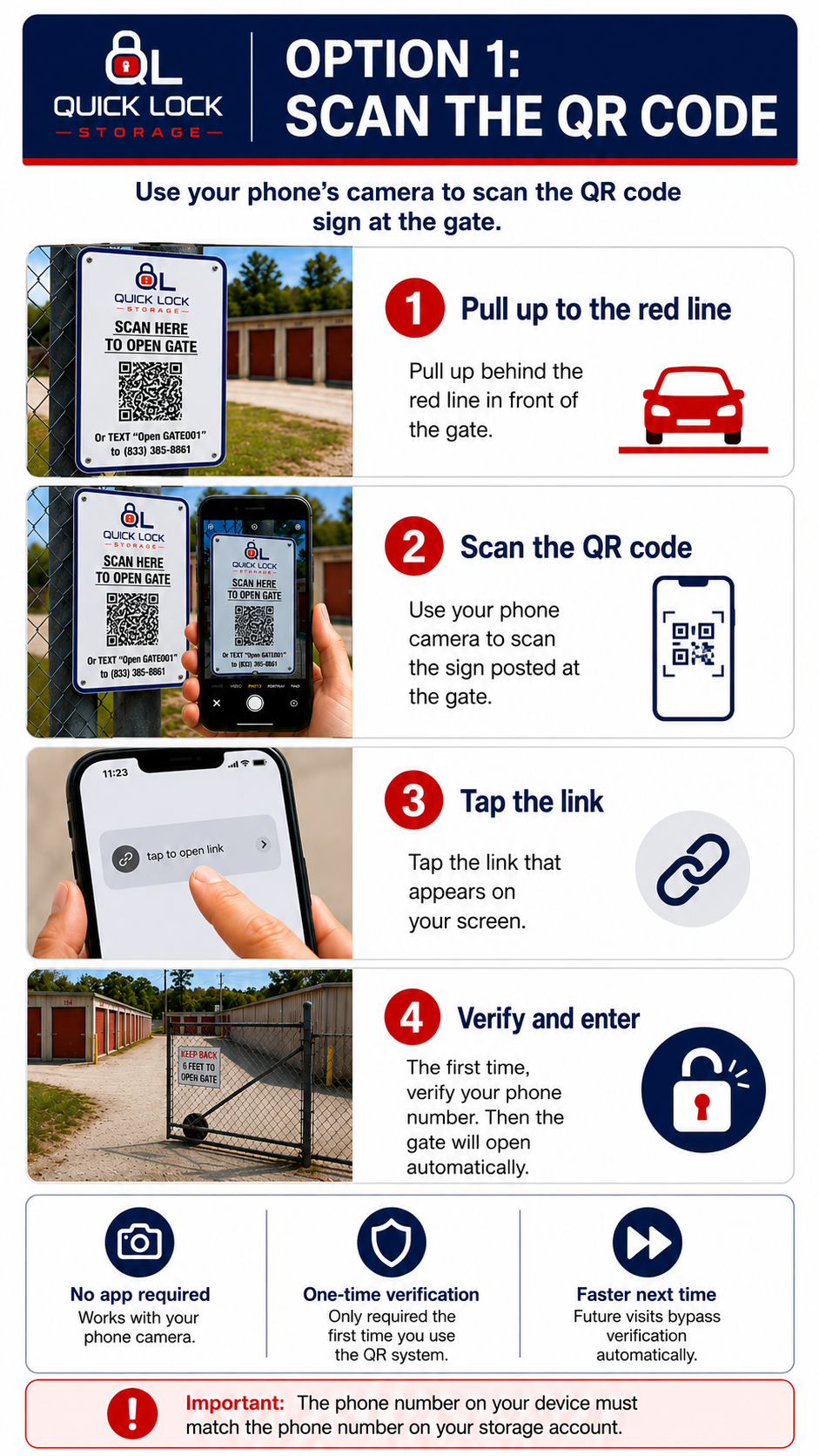
✅ No app download required works from your phone's camera or via text message
✅ Verification is only required the first time you use the system
✅ Future visits will bypass verification automatically
Note: The phone number of the device MUST match the phone number in your customer account.
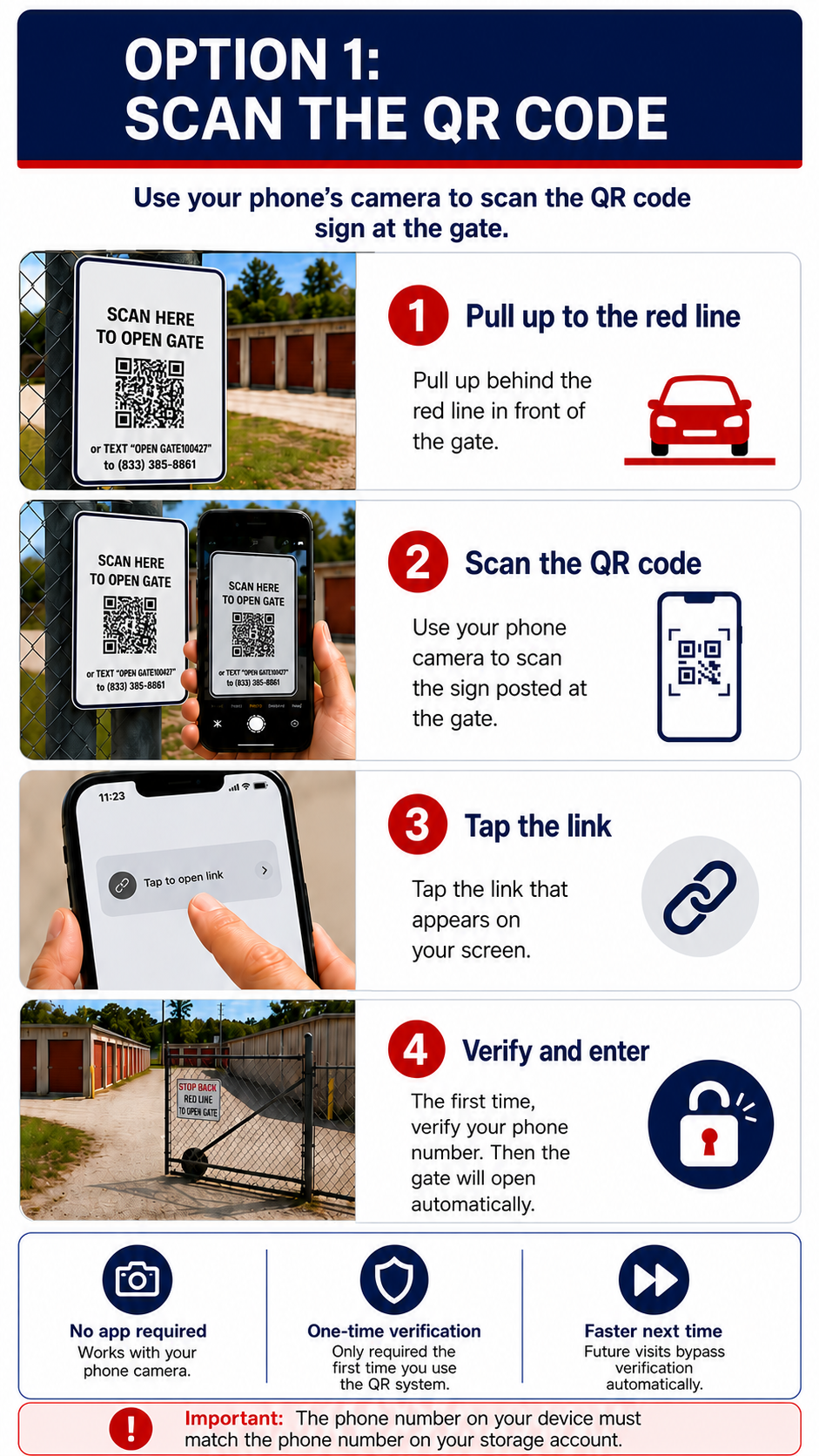
No smartphone or internet? No problem.
Simply text the words:
Open GATE100427
to (833) 385-8861
The gate will automatically open once your access is verified.
Note: The phone number of the device MUST match the phone number in your customer account.
___________________________
IMPORTANT REMINDERS
___________________________
• Your account must be current in order to access the facility
• Facility access remains available 24/7
• The phone number you use must match the phone number on your storage account
• The first time you use the QR system, you will be asked to complete a one-time phone verification
• Future visits will bypass verification automatically - Just scan the QR Code to gain access
• Pull up to the red line before scanning or texting
• Do not share your access with others
• If you recently changed your phone number, please update it in your online account or by contacting us prior to visiting the facility
___________________________
FREQUENTLY ASKED QUESTIONS
___________________________
Q: Will I have to verify my phone every time?
A: No. Verification is only required the first time you use the QR system. Once verified, scanning the QR Code will allow you access without further verification.
Q: Do I still have 24/7 access?
A: Yes. Facility access remains available 24/7 for customers with current accounts.
Q: What if I don’t have a smartphone or internet access?
A: You can text the words:
Open GATE100427
to (833) 385-8861 to open the gate.
Q: What if my phone number changed?
A: Please update the phone number in your online account or contact us before arriving at the facility
___________________________
Why We Made This Change
___________________________
This upgrade helps us:
✅ Improve facility security
✅ Prevent unauthorized access
✅ Eliminate forgotten gate codes
✅ Provide faster and easier gate entry
✅ Better manage gate access automatically
___________________________
NEED HELP?
___________________________
📞 910-807-3900
🌐 https://www.quicklockmaxton.com
We appreciate your cooperation during this transition and are confident this new system will improve your experience at Quick Lock Storage – Maxton.
Thank you for choosing Quick Lock Storage.
Sincerely,
Quick Lock Storage – Maxton Management